Kitab
HomeBlogAboutDashboard
Kitab

A multilingual blog starter showcasing RTL support and Arabic typography.

Navigation

  • Home
  • Blog
  • About

Resources

  • GitHub
  • Documentation
  • Components

Connect

2025 Kitab. All rights reserved.

Made with noorui-rtl and Next.js

Kitab
HomeBlogAboutDashboard
Kitab

A multilingual blog starter showcasing RTL support and Arabic typography.

Navigation

  • Home
  • Blog
  • About

Resources

  • GitHub
  • Documentation
  • Components

Connect

2025 Kitab. All rights reserved.

Made with noorui-rtl and Next.js

  1. Home
  2. Blog
  3. Choosing Arabic Fonts for the Web
Typography

Choosing Arabic Fonts for the Web

A comprehensive guide to selecting, pairing, and optimizing Arabic web fonts for performance and readability.

10 min read0
Choosing Arabic Fonts for the Web
AM

Amira Hassan

Linguist and typographer specializing in Arabic script history and evolution.

The Landscape of Arabic Web Typography

Typography is the foundation of good design, and in Arabic web development, choosing the right font is more critical than many realize. Arabic script has unique characteristics that make font selection both challenging and crucial: connected letters, contextual forms, optional diacritics, and varied calligraphic traditions.

Unlike Latin fonts where any readable typeface will generally work, Arabic fonts can dramatically affect readability, cultural appropriateness, and technical performance. A poor font choice can make your content difficult to read or culturally mismatched to your audience.

The good news? The Arabic web font landscape has matured significantly in recent years. We now have excellent options that balance tradition with modern design sensibilities.

Arabic fonts are typically 2-3x larger than equivalent Latin fonts due to the complexity of letter forms, contextual shaping, and ligature requirements. Performance optimization is essential.

Understanding Arabic Font Styles

Before diving into specific fonts, let's understand the two major style categories:

Naskh Style

Naskh (نسخ) is the standard style used for body text. It's what you see in most books, newspapers, and websites. Naskh is characterized by:

  • Clear, legible letterforms
  • Horizontal text flow
  • Moderate stroke contrast
  • Rounded curves
  • Well-suited for reading long passages

Best for: Body text, articles, documentation, formal content

Kufi Style

Kufi (كوفي) is more geometric and angular. Modern Kufi fonts are often used for:

  • Headlines and titles
  • Logos and branding
  • Short, impactful text
  • Modern, minimalist designs

Best for: Headings, UI elements, logos, display text

"

"The right Arabic font isn't just about aesthetics—it's about respecting the reading patterns and cultural expectations of your audience."

"

Font Comparison: The Top Contenders

Let's examine the most popular and reliable Arabic web fonts available today.

1. Noto Sans Arabic

Type: Sans-serif, Kufi-inspired Designer: Google Fonts Weights: 9 weights (Thin to Black)

Characteristics:

  • Part of Google's mission to support all languages ("Noto" = "No Tofu")
  • Excellent Unicode coverage
  • Modern, clean aesthetic
  • Works well at all sizes
  • Pairs naturally with Noto Sans for Latin text

File size: ~150KB (Regular weight, woff2)

Best use cases:

  • Web applications
  • Multilingual interfaces
  • Modern, neutral designs
  • When you need extensive weight variety
@import url('https://fonts.googleapis.com/css2?family=Noto+Sans+Arabic:wght@100..900&display=swap');
 
body {
  font-family: 'Noto Sans Arabic', sans-serif;
}

Noto Sans Arabic is an excellent default choice for web applications. Its wide character support and multiple weights make it versatile and reliable.

2. Cairo

Type: Sans-serif, geometric Designer: Mohamed Gaber Weights: 7 weights (ExtraLight to Black)

Characteristics:

  • Popular in Egyptian and North African markets
  • Geometric, modern appearance
  • Clean lines with a contemporary feel
  • Open-source and free
  • Good balance between traditional and modern

File size: ~120KB (Regular weight, woff2)

Best use cases:

  • Startup websites
  • Tech companies
  • Modern brands
  • When you want a fresh, contemporary look
@import url('https://fonts.googleapis.com/css2?family=Cairo:wght@200..1000&display=swap');
 
.heading {
  font-family: 'Cairo', sans-serif;
  font-weight: 700;
}

3. IBM Plex Sans Arabic

Type: Sans-serif Designer: IBM (Bold Monday studio) Weights: 7 weights (Thin to Bold)

Characteristics:

  • Corporate, professional appearance
  • Designed to pair with IBM Plex Sans Latin
  • Excellent for enterprise applications
  • Strong brand identity
  • Technical documentation aesthetic

File size: ~135KB (Regular weight, woff2)

Best use cases:

  • Enterprise dashboards
  • Professional services
  • Technical documentation
  • Corporate websites
@import url('https://fonts.googleapis.com/css2?family=IBM+Plex+Sans+Arabic:wght@100..700&display=swap');
 
.corporate-text {
  font-family: 'IBM Plex Sans Arabic', sans-serif;
}
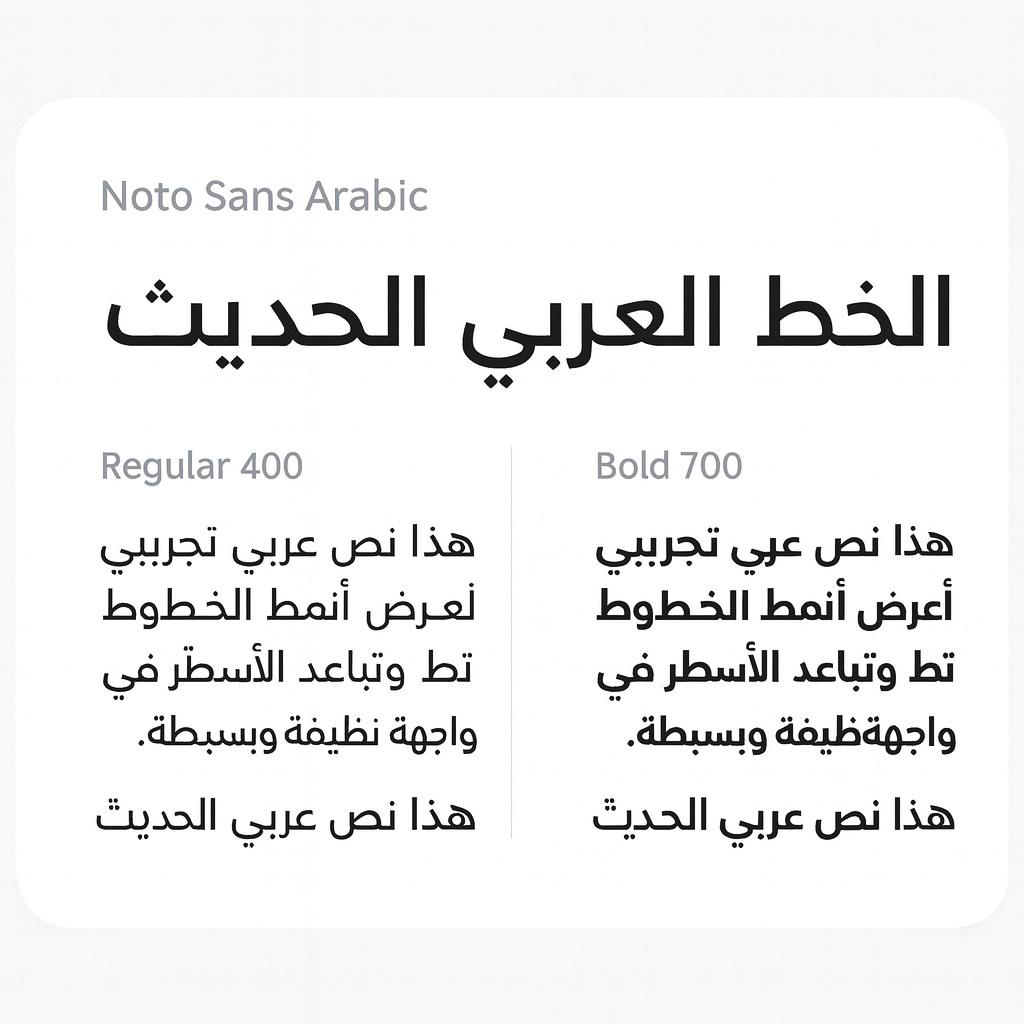
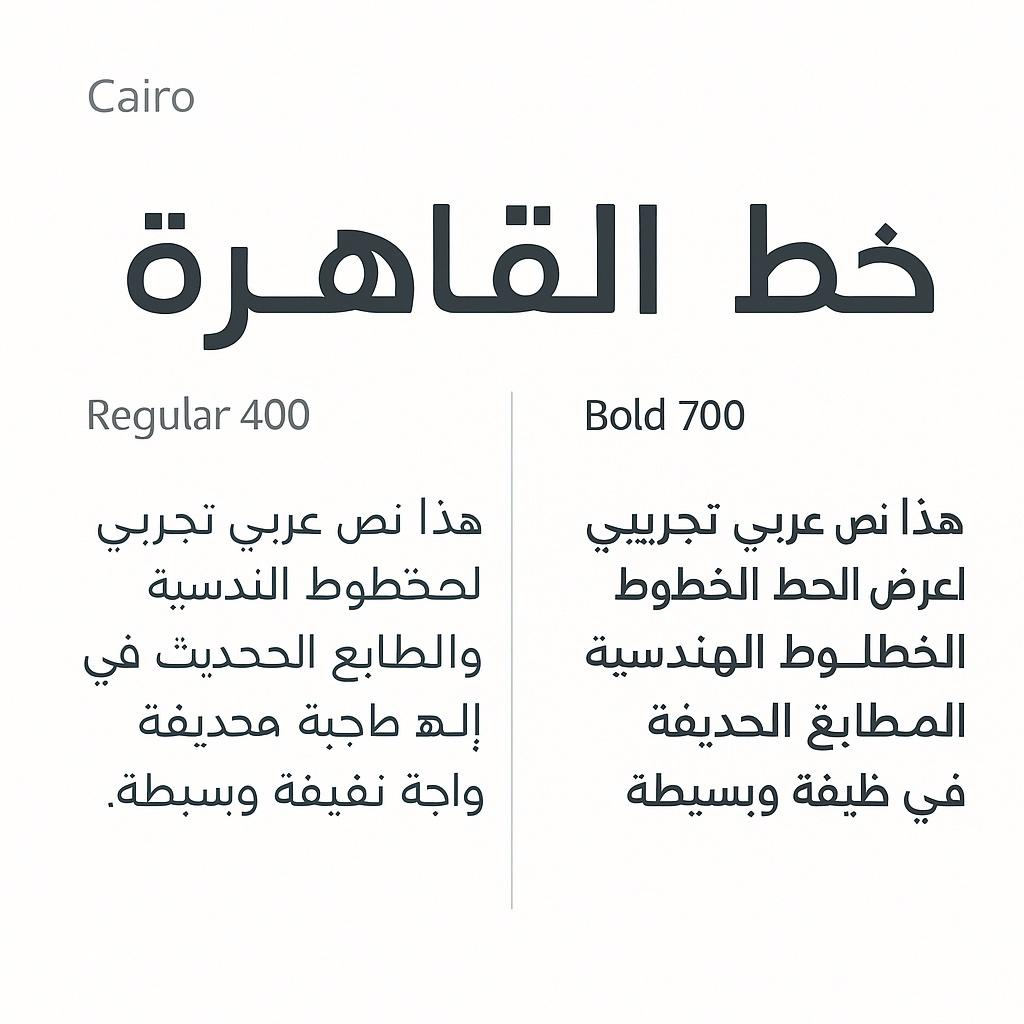
Noto Sans Arabic sample text
Noto Sans Arabic - Neutral and versatile
Cairo font sample text
Cairo - Modern and geometric

4. Tajawal

Type: Sans-serif, Kufi-style Designer: Boutros International Weights: 5 weights (ExtraLight to Black)

Characteristics:

  • Lightweight and optimized for web
  • Smaller file sizes than competitors
  • Good for UI elements
  • Clean, minimalist design
  • Created specifically for screen display

File size: ~85KB (Regular weight, woff2)

Best use cases:

  • Mobile applications
  • Performance-critical sites
  • UI components
  • When file size matters
@import url('https://fonts.googleapis.com/css2?family=Tajawal:wght@200..900&display=swap');
 
.button {
  font-family: 'Tajawal', sans-serif;
  font-weight: 500;
}

5. Amiri

Type: Serif, Naskh style Designer: Khaled Hosny Weights: 2 weights (Regular, Bold)

Characteristics:

  • Traditional Naskh calligraphic style
  • Includes extensive diacritic support
  • Perfect for classical Arabic texts
  • High-quality ligatures
  • Inspired by traditional metal type

File size: ~185KB (Regular weight, woff2)

Best use cases:

  • Literary content
  • Religious texts
  • Traditional or formal contexts
  • When authenticity matters
  • Poetry and classical literature
@import url('https://fonts.googleapis.com/css2?family=Amiri:wght@400;700&display=swap');
 
.traditional-text {
  font-family: 'Amiri', serif;
  line-height: 1.8; /* Naskh needs more line-height */
}

Amiri includes extensive support for Quranic text, including all diacritical marks and special symbols. If you're displaying religious content, this is your best choice.

6. Readex Pro

Type: Variable font, Sans-serif Designer: Thomas Jockin (for Google Fonts) Weights: Variable (200-700)

Characteristics:

  • Modern variable font technology
  • Single file for all weights
  • Optimized for screen reading
  • Contemporary design
  • Excellent for reading interfaces

File size: ~145KB (variable font, woff2)

Best use cases:

  • Reading apps
  • E-books and long-form content
  • When you need multiple weights efficiently
  • Modern web applications
@import url('https://fonts.googleapis.com/css2?family=Readex+Pro:wght@200..700&display=swap');
 
.reading-interface {
  font-family: 'Readex Pro', sans-serif;
  font-variation-settings: 'wght' 350; /* Variable font control */
}

Font Comparison Table

FontStyleWeightsFile SizeBest ForPerformance
Noto Sans ArabicSans-serif (Kufi)9~150KBGeneral purpose, appsGood
CairoSans-serif (Geometric)7~120KBModern websitesExcellent
IBM Plex ArabicSans-serif7~135KBEnterprise, corporateGood
TajawalSans-serif (Kufi)5~85KBUI, mobileExcellent
AmiriSerif (Naskh)2~185KBTraditional, formalModerate
Readex ProVariableVariable~145KBReading appsGood

Pairing Arabic and Latin Fonts

Most bilingual websites need both Arabic and Latin scripts. Here's how to pair them effectively:

The Matching Principles

  1. Similar x-height: Latin and Arabic fonts should have similar proportions
  2. Matching weight: Both fonts should feel equally heavy or light
  3. Compatible personality: Geometric pairs with geometric, humanist with humanist
  4. Consistent stroke width: Similar thickness creates visual harmony

Recommended Pairings

/* Pairing 1: Noto Sans Arabic + Noto Sans */
:root {
  --font-ar: 'Noto Sans Arabic', sans-serif;
  --font-en: 'Noto Sans', sans-serif;
}
 
/* Pairing 2: Cairo + Inter */
:root {
  --font-ar: 'Cairo', sans-serif;
  --font-en: 'Inter', sans-serif;
}
 
/* Pairing 3: IBM Plex Sans Arabic + IBM Plex Sans */
:root {
  --font-ar: 'IBM Plex Sans Arabic', sans-serif;
  --font-en: 'IBM Plex Sans', sans-serif;
}
 
/* Pairing 4: Tajawal + Roboto */
:root {
  --font-ar: 'Tajawal', sans-serif;
  --font-en: 'Roboto', sans-serif;
}
 
/* Pairing 5: Amiri + Crimson Pro */
:root {
  --font-ar: 'Amiri', serif;
  --font-en: 'Crimson Pro', serif;
}
 
/* Usage with language detection */
body {
  font-family: var(--font-en);
}
 
:lang(ar) {
  font-family: var(--font-ar);
}

The Noto font family (Noto Sans Arabic + Noto Sans) is specifically designed to work together across all scripts. If you want guaranteed harmony, start there.

Testing Your Pairings

When testing font pairings, check these scenarios:

<!-- Mixed content test -->
<p lang="ar">
  مرحباً بك في <span lang="en">GitHub</span> العربي
</p>
 
<!-- UI element test -->
<button>
  <span lang="ar">إضافة</span> Product
</button>
 
<!-- Navigation test -->
<nav>
  <a href="/" lang="ar">الرئيسية</a>
  <a href="/products">Products</a>
</nav>

Look for jarring size differences, weight mismatches, or awkward spacing.

Performance Optimization Strategies

Arabic fonts are large. Here's how to load them efficiently:

1. Subset Your Fonts

Only load the characters you need:

<!-- Google Fonts: Specify text parameter -->
<link href="https://fonts.googleapis.com/css2?family=Noto+Sans+Arabic:wght@400;700&text=أبتثجحخدذرزسشصضطظعغفقكلمنهويءآإؤئ" rel="stylesheet">

Or use font subsetting tools:

# Using glyphhanger
npm install -g glyphhanger
 
# Subset a font file
glyphhanger --subset=font.ttf --formats=woff2 --css

2. Use font-display

Control how fonts load and prevent layout shifts:

@font-face {
  font-family: 'Noto Sans Arabic';
  src: url('/fonts/noto-sans-arabic.woff2') format('woff2');
  font-display: swap; /* Show fallback, swap when loaded */
  font-weight: 400;
  font-style: normal;
}

font-display options:

  • swap - Show fallback immediately, swap when loaded (recommended)
  • block - Brief invisible period, then show font
  • fallback - Very brief invisible period, swap if loaded quickly, otherwise stay with fallback
  • optional - Let browser decide based on connection speed

Avoid font-display: block for Arabic fonts. The file sizes can cause long blocking periods, creating a poor user experience. Use swap instead.

3. Preload Critical Fonts

For fonts used above the fold:

<link rel="preload" href="/fonts/noto-sans-arabic-regular.woff2" as="font" type="font/woff2" crossorigin>

4. Variable Fonts for Multiple Weights

If you need many weights, consider variable fonts:

@font-face {
  font-family: 'Readex Pro';
  src: url('/fonts/readex-pro-variable.woff2') format('woff2-variations');
  font-weight: 200 700; /* Full range in one file */
  font-display: swap;
}
 
/* Use any weight */
.heading {
  font-weight: 350; /* Exact weight */
}

5. Self-Host When Possible

Self-hosting gives you more control:

/* fonts.css */
@font-face {
  font-family: 'Cairo';
  src: url('/fonts/cairo-regular.woff2') format('woff2');
  font-weight: 400;
  font-display: swap;
  /* Unicode range for Arabic */
  unicode-range: U+0600-06FF, U+FB50-FDFF, U+FE70-FEFF;
}
 
@font-face {
  font-family: 'Cairo';
  src: url('/fonts/cairo-bold.woff2') format('woff2');
  font-weight: 700;
  font-display: swap;
  unicode-range: U+0600-06FF, U+FB50-FDFF, U+FE70-FEFF;
}
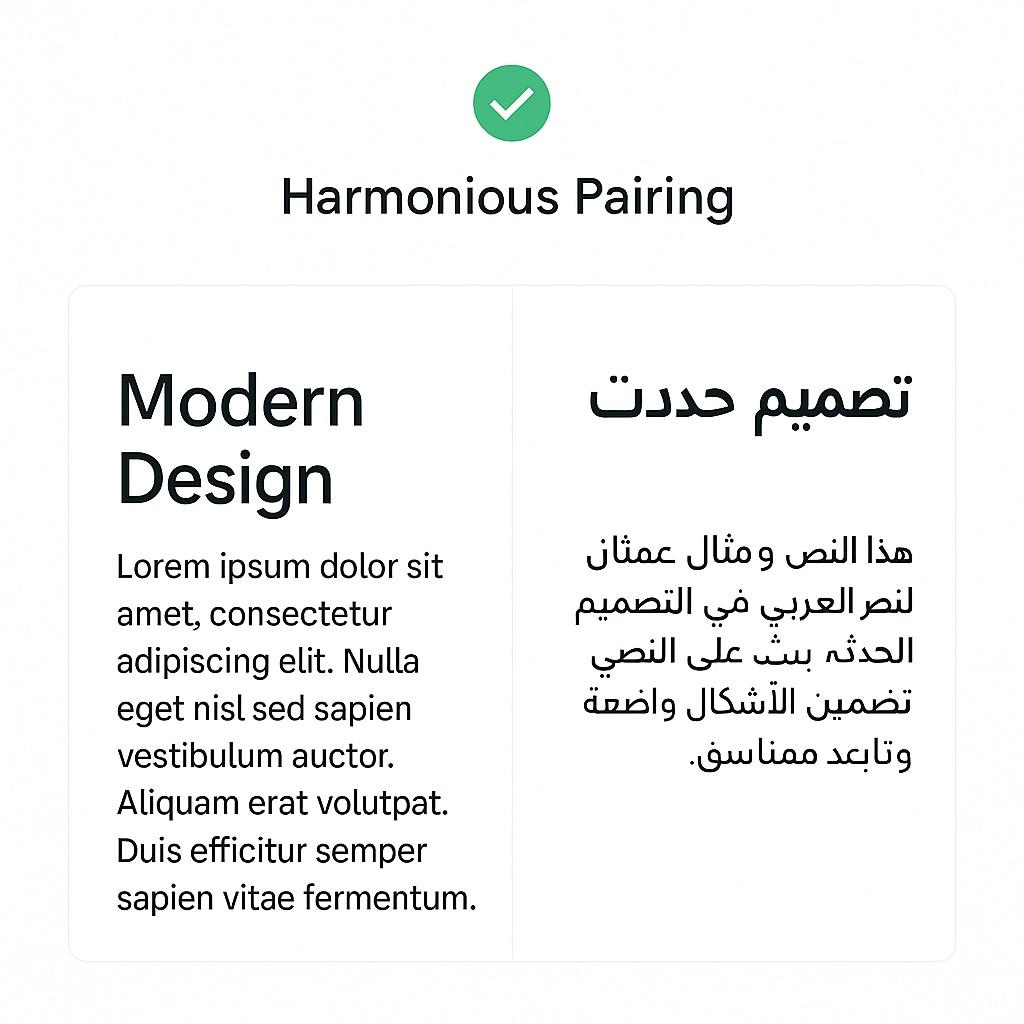
Good font pairing example
Good pairing: Similar weight and proportions
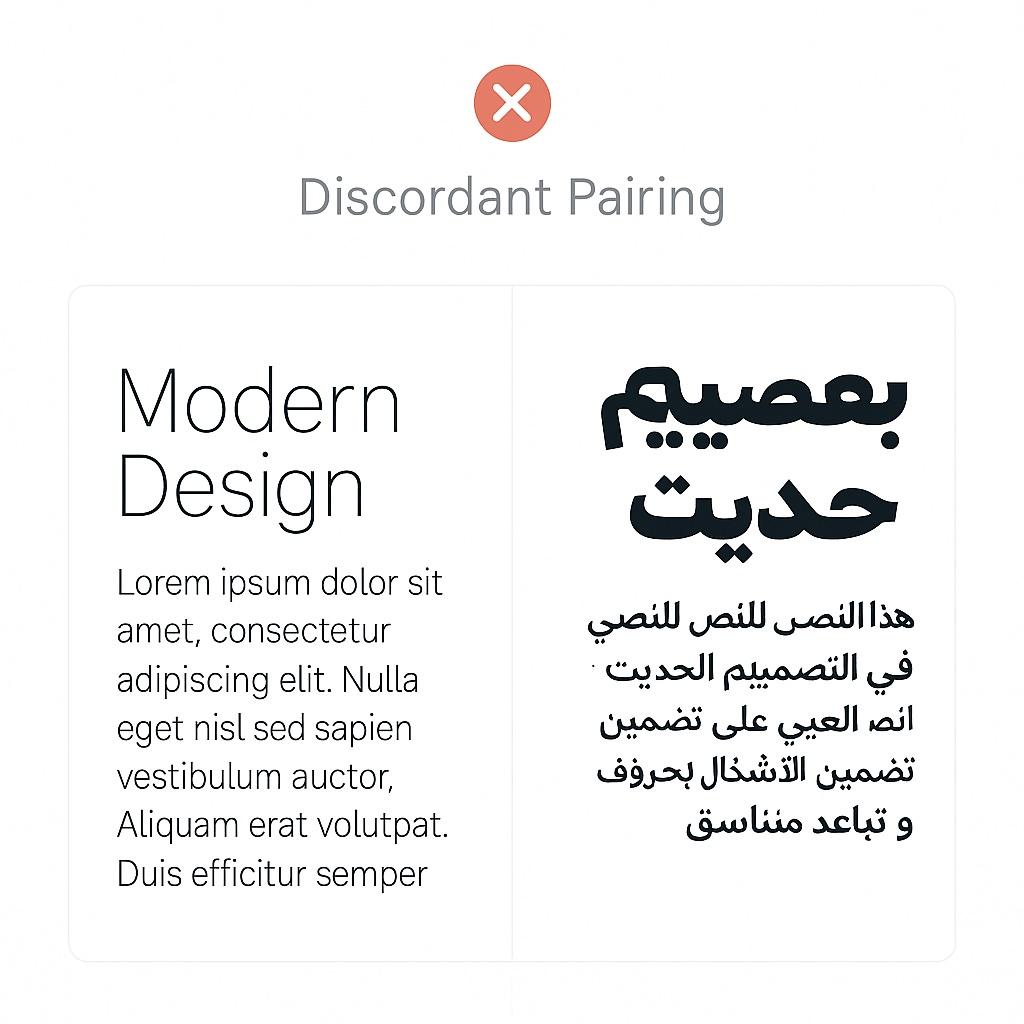
Bad font pairing example
Bad pairing: Mismatched weight and style

Line Height and Spacing Considerations

Arabic text needs different spacing than Latin:

/* Latin text */
.text-latin {
  font-size: 16px;
  line-height: 1.5; /* 24px */
  letter-spacing: 0;
}
 
/* Arabic text */
.text-arabic {
  font-size: 16px;
  line-height: 1.8; /* 28.8px - More space for diacritics */
  letter-spacing: 0; /* Never add letter-spacing to Arabic! */
}

Never use letter-spacing on Arabic text. It breaks the connections between letters and destroys the script's visual integrity.

Adjusting for Naskh vs Kufi

Naskh fonts (like Amiri) need more line-height:

.naskh-text {
  font-family: 'Amiri', serif;
  line-height: 2.0; /* Generous spacing */
}

Kufi fonts (like Cairo, Tajawal) are more compact:

.kufi-text {
  font-family: 'Cairo', sans-serif;
  line-height: 1.6; /* Less spacing needed */
}

When to Use Each Font

Here's a quick decision tree:

Need a safe, versatile default? → Noto Sans Arabic

Building a modern startup or tech product? → Cairo

Creating an enterprise dashboard? → IBM Plex Sans Arabic

Optimizing for mobile or performance? → Tajawal

Displaying traditional, literary, or religious content? → Amiri

Building a reading interface? → Readex Pro

Need multiple weights efficiently? → Readex Pro (variable font)

Key Takeaways

  1. Font style matters: Choose Naskh for body text, Kufi for headings and UI
  2. File size is significant: Arabic fonts are 2-3x larger than Latin equivalents
  3. Pairing is critical: Match x-height, weight, and personality between Arabic and Latin fonts
  4. Optimize loading: Use font-display: swap, subsetting, and preloading
  5. Line height differs: Arabic needs more line-height (1.6-2.0) than Latin (1.4-1.6)
  6. Never letter-space: Arabic is a connected script—spacing breaks it
  7. Variable fonts save bytes: Consider variable fonts if you need multiple weights
  8. Context matters: Traditional content needs traditional fonts; modern apps need modern fonts

Further Reading

  • Understanding Arabic Typography
  • Performance Optimization for RTL Websites
  • Diacritics Across Scripts
  • The Anatomy of Arabic Letters
typography
fonts
arabic
performance
web-fonts
Back to Blog

Related Articles

Designing for Bilingual Users: Code-Switching in UI

10 min read

Building Accessible Forms for Arabic Users

12 min read

The Shared Roots of Arabic and Urdu Script

10 min read

  1. Home
  2. Blog
  3. Choosing Arabic Fonts for the Web
Typography

Choosing Arabic Fonts for the Web

A comprehensive guide to selecting, pairing, and optimizing Arabic web fonts for performance and readability.

10 min read0
Choosing Arabic Fonts for the Web
AM

Amira Hassan

Linguist and typographer specializing in Arabic script history and evolution.

The Landscape of Arabic Web Typography

Typography is the foundation of good design, and in Arabic web development, choosing the right font is more critical than many realize. Arabic script has unique characteristics that make font selection both challenging and crucial: connected letters, contextual forms, optional diacritics, and varied calligraphic traditions.

Unlike Latin fonts where any readable typeface will generally work, Arabic fonts can dramatically affect readability, cultural appropriateness, and technical performance. A poor font choice can make your content difficult to read or culturally mismatched to your audience.

The good news? The Arabic web font landscape has matured significantly in recent years. We now have excellent options that balance tradition with modern design sensibilities.

Arabic fonts are typically 2-3x larger than equivalent Latin fonts due to the complexity of letter forms, contextual shaping, and ligature requirements. Performance optimization is essential.

Understanding Arabic Font Styles

Before diving into specific fonts, let's understand the two major style categories:

Naskh Style

Naskh (نسخ) is the standard style used for body text. It's what you see in most books, newspapers, and websites. Naskh is characterized by:

  • Clear, legible letterforms
  • Horizontal text flow
  • Moderate stroke contrast
  • Rounded curves
  • Well-suited for reading long passages

Best for: Body text, articles, documentation, formal content

Kufi Style

Kufi (كوفي) is more geometric and angular. Modern Kufi fonts are often used for:

  • Headlines and titles
  • Logos and branding
  • Short, impactful text
  • Modern, minimalist designs

Best for: Headings, UI elements, logos, display text

"

"The right Arabic font isn't just about aesthetics—it's about respecting the reading patterns and cultural expectations of your audience."

"

Font Comparison: The Top Contenders

Let's examine the most popular and reliable Arabic web fonts available today.

1. Noto Sans Arabic

Type: Sans-serif, Kufi-inspired Designer: Google Fonts Weights: 9 weights (Thin to Black)

Characteristics:

  • Part of Google's mission to support all languages ("Noto" = "No Tofu")
  • Excellent Unicode coverage
  • Modern, clean aesthetic
  • Works well at all sizes
  • Pairs naturally with Noto Sans for Latin text

File size: ~150KB (Regular weight, woff2)

Best use cases:

  • Web applications
  • Multilingual interfaces
  • Modern, neutral designs
  • When you need extensive weight variety
@import url('https://fonts.googleapis.com/css2?family=Noto+Sans+Arabic:wght@100..900&display=swap');
 
body {
  font-family: 'Noto Sans Arabic', sans-serif;
}

Noto Sans Arabic is an excellent default choice for web applications. Its wide character support and multiple weights make it versatile and reliable.

2. Cairo

Type: Sans-serif, geometric Designer: Mohamed Gaber Weights: 7 weights (ExtraLight to Black)

Characteristics:

  • Popular in Egyptian and North African markets
  • Geometric, modern appearance
  • Clean lines with a contemporary feel
  • Open-source and free
  • Good balance between traditional and modern

File size: ~120KB (Regular weight, woff2)

Best use cases:

  • Startup websites
  • Tech companies
  • Modern brands
  • When you want a fresh, contemporary look
@import url('https://fonts.googleapis.com/css2?family=Cairo:wght@200..1000&display=swap');
 
.heading {
  font-family: 'Cairo', sans-serif;
  font-weight: 700;
}

3. IBM Plex Sans Arabic

Type: Sans-serif Designer: IBM (Bold Monday studio) Weights: 7 weights (Thin to Bold)

Characteristics:

  • Corporate, professional appearance
  • Designed to pair with IBM Plex Sans Latin
  • Excellent for enterprise applications
  • Strong brand identity
  • Technical documentation aesthetic

File size: ~135KB (Regular weight, woff2)

Best use cases:

  • Enterprise dashboards
  • Professional services
  • Technical documentation
  • Corporate websites
@import url('https://fonts.googleapis.com/css2?family=IBM+Plex+Sans+Arabic:wght@100..700&display=swap');
 
.corporate-text {
  font-family: 'IBM Plex Sans Arabic', sans-serif;
}
Noto Sans Arabic sample text
Noto Sans Arabic - Neutral and versatile
Cairo font sample text
Cairo - Modern and geometric

4. Tajawal

Type: Sans-serif, Kufi-style Designer: Boutros International Weights: 5 weights (ExtraLight to Black)

Characteristics:

  • Lightweight and optimized for web
  • Smaller file sizes than competitors
  • Good for UI elements
  • Clean, minimalist design
  • Created specifically for screen display

File size: ~85KB (Regular weight, woff2)

Best use cases:

  • Mobile applications
  • Performance-critical sites
  • UI components
  • When file size matters
@import url('https://fonts.googleapis.com/css2?family=Tajawal:wght@200..900&display=swap');
 
.button {
  font-family: 'Tajawal', sans-serif;
  font-weight: 500;
}

5. Amiri

Type: Serif, Naskh style Designer: Khaled Hosny Weights: 2 weights (Regular, Bold)

Characteristics:

  • Traditional Naskh calligraphic style
  • Includes extensive diacritic support
  • Perfect for classical Arabic texts
  • High-quality ligatures
  • Inspired by traditional metal type

File size: ~185KB (Regular weight, woff2)

Best use cases:

  • Literary content
  • Religious texts
  • Traditional or formal contexts
  • When authenticity matters
  • Poetry and classical literature
@import url('https://fonts.googleapis.com/css2?family=Amiri:wght@400;700&display=swap');
 
.traditional-text {
  font-family: 'Amiri', serif;
  line-height: 1.8; /* Naskh needs more line-height */
}

Amiri includes extensive support for Quranic text, including all diacritical marks and special symbols. If you're displaying religious content, this is your best choice.

6. Readex Pro

Type: Variable font, Sans-serif Designer: Thomas Jockin (for Google Fonts) Weights: Variable (200-700)

Characteristics:

  • Modern variable font technology
  • Single file for all weights
  • Optimized for screen reading
  • Contemporary design
  • Excellent for reading interfaces

File size: ~145KB (variable font, woff2)

Best use cases:

  • Reading apps
  • E-books and long-form content
  • When you need multiple weights efficiently
  • Modern web applications
@import url('https://fonts.googleapis.com/css2?family=Readex+Pro:wght@200..700&display=swap');
 
.reading-interface {
  font-family: 'Readex Pro', sans-serif;
  font-variation-settings: 'wght' 350; /* Variable font control */
}

Font Comparison Table

FontStyleWeightsFile SizeBest ForPerformance
Noto Sans ArabicSans-serif (Kufi)9~150KBGeneral purpose, appsGood
CairoSans-serif (Geometric)7~120KBModern websitesExcellent
IBM Plex ArabicSans-serif7~135KBEnterprise, corporateGood
TajawalSans-serif (Kufi)5~85KBUI, mobileExcellent
AmiriSerif (Naskh)2~185KBTraditional, formalModerate
Readex ProVariableVariable~145KBReading appsGood

Pairing Arabic and Latin Fonts

Most bilingual websites need both Arabic and Latin scripts. Here's how to pair them effectively:

The Matching Principles

  1. Similar x-height: Latin and Arabic fonts should have similar proportions
  2. Matching weight: Both fonts should feel equally heavy or light
  3. Compatible personality: Geometric pairs with geometric, humanist with humanist
  4. Consistent stroke width: Similar thickness creates visual harmony

Recommended Pairings

/* Pairing 1: Noto Sans Arabic + Noto Sans */
:root {
  --font-ar: 'Noto Sans Arabic', sans-serif;
  --font-en: 'Noto Sans', sans-serif;
}
 
/* Pairing 2: Cairo + Inter */
:root {
  --font-ar: 'Cairo', sans-serif;
  --font-en: 'Inter', sans-serif;
}
 
/* Pairing 3: IBM Plex Sans Arabic + IBM Plex Sans */
:root {
  --font-ar: 'IBM Plex Sans Arabic', sans-serif;
  --font-en: 'IBM Plex Sans', sans-serif;
}
 
/* Pairing 4: Tajawal + Roboto */
:root {
  --font-ar: 'Tajawal', sans-serif;
  --font-en: 'Roboto', sans-serif;
}
 
/* Pairing 5: Amiri + Crimson Pro */
:root {
  --font-ar: 'Amiri', serif;
  --font-en: 'Crimson Pro', serif;
}
 
/* Usage with language detection */
body {
  font-family: var(--font-en);
}
 
:lang(ar) {
  font-family: var(--font-ar);
}

The Noto font family (Noto Sans Arabic + Noto Sans) is specifically designed to work together across all scripts. If you want guaranteed harmony, start there.

Testing Your Pairings

When testing font pairings, check these scenarios:

<!-- Mixed content test -->
<p lang="ar">
  مرحباً بك في <span lang="en">GitHub</span> العربي
</p>
 
<!-- UI element test -->
<button>
  <span lang="ar">إضافة</span> Product
</button>
 
<!-- Navigation test -->
<nav>
  <a href="/" lang="ar">الرئيسية</a>
  <a href="/products">Products</a>
</nav>

Look for jarring size differences, weight mismatches, or awkward spacing.

Performance Optimization Strategies

Arabic fonts are large. Here's how to load them efficiently:

1. Subset Your Fonts

Only load the characters you need:

<!-- Google Fonts: Specify text parameter -->
<link href="https://fonts.googleapis.com/css2?family=Noto+Sans+Arabic:wght@400;700&text=أبتثجحخدذرزسشصضطظعغفقكلمنهويءآإؤئ" rel="stylesheet">

Or use font subsetting tools:

# Using glyphhanger
npm install -g glyphhanger
 
# Subset a font file
glyphhanger --subset=font.ttf --formats=woff2 --css

2. Use font-display

Control how fonts load and prevent layout shifts:

@font-face {
  font-family: 'Noto Sans Arabic';
  src: url('/fonts/noto-sans-arabic.woff2') format('woff2');
  font-display: swap; /* Show fallback, swap when loaded */
  font-weight: 400;
  font-style: normal;
}

font-display options:

  • swap - Show fallback immediately, swap when loaded (recommended)
  • block - Brief invisible period, then show font
  • fallback - Very brief invisible period, swap if loaded quickly, otherwise stay with fallback
  • optional - Let browser decide based on connection speed

Avoid font-display: block for Arabic fonts. The file sizes can cause long blocking periods, creating a poor user experience. Use swap instead.

3. Preload Critical Fonts

For fonts used above the fold:

<link rel="preload" href="/fonts/noto-sans-arabic-regular.woff2" as="font" type="font/woff2" crossorigin>

4. Variable Fonts for Multiple Weights

If you need many weights, consider variable fonts:

@font-face {
  font-family: 'Readex Pro';
  src: url('/fonts/readex-pro-variable.woff2') format('woff2-variations');
  font-weight: 200 700; /* Full range in one file */
  font-display: swap;
}
 
/* Use any weight */
.heading {
  font-weight: 350; /* Exact weight */
}

5. Self-Host When Possible

Self-hosting gives you more control:

/* fonts.css */
@font-face {
  font-family: 'Cairo';
  src: url('/fonts/cairo-regular.woff2') format('woff2');
  font-weight: 400;
  font-display: swap;
  /* Unicode range for Arabic */
  unicode-range: U+0600-06FF, U+FB50-FDFF, U+FE70-FEFF;
}
 
@font-face {
  font-family: 'Cairo';
  src: url('/fonts/cairo-bold.woff2') format('woff2');
  font-weight: 700;
  font-display: swap;
  unicode-range: U+0600-06FF, U+FB50-FDFF, U+FE70-FEFF;
}
Good font pairing example
Good pairing: Similar weight and proportions
Bad font pairing example
Bad pairing: Mismatched weight and style

Line Height and Spacing Considerations

Arabic text needs different spacing than Latin:

/* Latin text */
.text-latin {
  font-size: 16px;
  line-height: 1.5; /* 24px */
  letter-spacing: 0;
}
 
/* Arabic text */
.text-arabic {
  font-size: 16px;
  line-height: 1.8; /* 28.8px - More space for diacritics */
  letter-spacing: 0; /* Never add letter-spacing to Arabic! */
}

Never use letter-spacing on Arabic text. It breaks the connections between letters and destroys the script's visual integrity.

Adjusting for Naskh vs Kufi

Naskh fonts (like Amiri) need more line-height:

.naskh-text {
  font-family: 'Amiri', serif;
  line-height: 2.0; /* Generous spacing */
}

Kufi fonts (like Cairo, Tajawal) are more compact:

.kufi-text {
  font-family: 'Cairo', sans-serif;
  line-height: 1.6; /* Less spacing needed */
}

When to Use Each Font

Here's a quick decision tree:

Need a safe, versatile default? → Noto Sans Arabic

Building a modern startup or tech product? → Cairo

Creating an enterprise dashboard? → IBM Plex Sans Arabic

Optimizing for mobile or performance? → Tajawal

Displaying traditional, literary, or religious content? → Amiri

Building a reading interface? → Readex Pro

Need multiple weights efficiently? → Readex Pro (variable font)

Key Takeaways

  1. Font style matters: Choose Naskh for body text, Kufi for headings and UI
  2. File size is significant: Arabic fonts are 2-3x larger than Latin equivalents
  3. Pairing is critical: Match x-height, weight, and personality between Arabic and Latin fonts
  4. Optimize loading: Use font-display: swap, subsetting, and preloading
  5. Line height differs: Arabic needs more line-height (1.6-2.0) than Latin (1.4-1.6)
  6. Never letter-space: Arabic is a connected script—spacing breaks it
  7. Variable fonts save bytes: Consider variable fonts if you need multiple weights
  8. Context matters: Traditional content needs traditional fonts; modern apps need modern fonts

Further Reading

  • Understanding Arabic Typography
  • Performance Optimization for RTL Websites
  • Diacritics Across Scripts
  • The Anatomy of Arabic Letters
typography
fonts
arabic
performance
web-fonts
Back to Blog

Related Articles

Designing for Bilingual Users: Code-Switching in UI

10 min read

Building Accessible Forms for Arabic Users

12 min read

The Shared Roots of Arabic and Urdu Script

10 min read

Comments (0)

Sign in to join the conversation

Comments (0)

Sign in to join the conversation