Kitab
HomeBlogAboutDashboard
Kitab

A multilingual blog starter showcasing RTL support and Arabic typography.

Navigation

  • Home
  • Blog
  • About

Resources

  • GitHub
  • Documentation
  • Components

Connect

2025 Kitab. All rights reserved.

Made with noorui-rtl and Next.js

Kitab
HomeBlogAboutDashboard
Kitab

A multilingual blog starter showcasing RTL support and Arabic typography.

Navigation

  • Home
  • Blog
  • About

Resources

  • GitHub
  • Documentation
  • Components

Connect

2025 Kitab. All rights reserved.

Made with noorui-rtl and Next.js

  1. Home
  2. Blog
  3. Designing for Bilingual Users: Code-Switching in UI
Cultural Context

Designing for Bilingual Users: Code-Switching in UI

Explore how bilingual users naturally mix languages—and why your UI should embrace code-switching rather than fight it.

10 min read26
Designing for Bilingual Users: Code-Switching in UI
AM

Amira Hassan

Linguist and typographer specializing in Arabic script history and evolution.

The Reality of Bilingual Communication

Walk into any café in Dubai, Beirut, or Casablanca, and you'll hear something like this:

"أنا going to the mall بعدين، you coming معي؟"

This seamless mixing of Arabic and English—known as code-switching—is how millions of people actually communicate. It's not confusion or poor language skills; it's a sophisticated linguistic practice that reflects the reality of multilingual life.

Yet most applications force users to pick a single language and stick with it. This creates friction between how people actually think and communicate and how we ask them to interact with our interfaces.

"

"Code-switching isn't a bug in human communication—it's a feature. Your UI should reflect that."

"

What is Code-Switching?

Code-switching is the practice of alternating between two or more languages within a single conversation or even a single sentence. It happens naturally among bilingual speakers and serves important social and cognitive functions.

Why People Code-Switch

  1. Efficiency: Some concepts are easier to express in one language
  2. Identity: Switching languages signals group membership
  3. Emphasis: Changing languages adds emotional weight
  4. Filling gaps: Using a word from another language when the first doesn't have an equivalent
  5. Social context: Adapting to the language comfort of others

In the Gulf states, it's incredibly common to mix Arabic and English:

  • Brand names: Always in English, even in Arabic sentences
  • Tech terms: "download", "app", "screenshot" often stay English
  • Work vocabulary: Many professional terms are English
  • Numbers: Sometimes spoken in English, even in Arabic conversations

Studies show that code-switching is more cognitively complex than speaking a single language. Bilingual users who code-switch are expert language managers, not confused speakers.

The Arabizi Phenomenon

Arabizi (also called "Franco-Arab" or "3arabeezy") is Arabic written using Latin letters and numbers to represent sounds that don't exist in the Latin alphabet.

How Arabizi Works

Numbers represent Arabic sounds:

  • 2 = ء (hamza/glottal stop)
  • 3 = ع (ayn)
  • 5 = خ (kha)
  • 6 = ط (ta)
  • 7 = ح (ha)
  • 8 = ق (qaf) - sometimes
  • 9 = ص (sad)

Examples:

  • مرحبا (marhaba) → mar7aba
  • صباح الخير (sabah al-khair) → 9aba7 el5eir
  • معلش (ma3lish) → ma3lesh
  • إن شاء الله (inshallah) → inshallah or inshaa2allah

Why Arabizi Exists

  1. Early internet constraints: Before good Arabic keyboard support, Arabizi was necessary
  2. Speed: Typing Arabizi on QWERTY keyboards is faster for some users
  3. Platform limitations: Some systems still handle Arabic poorly
  4. Casualness: Arabizi signals informal, friendly communication
  5. Habit: A generation grew up using it and continues by choice

"When I chat with friends, I use Arabizi. It feels more casual than formal Arabic script, and faster than switching keyboards. But for work documents, I switch to proper Arabic."

— Sara, 28, UX Designer in Cairo

While Arabizi was born from technical limitations, it's now a cultural choice. Many young Arabs prefer it for informal communication even when Arabic keyboards are easily available.

Don't assume Arabizi is disappearing. For many users, especially in informal contexts like chat and social media, it remains the preferred way to write Arabic casually.

Real-World Code-Switching in Apps

Let's look at how successful regional apps handle bilingual users.

Careem (Ride-hailing)

Language approach: Primarily Arabic interface with English brand names

Code-switching examples:

  • Button text: "احجز Careem الآن" (Book Careem now)
  • Car types: "Careem GO", "Careem Business" (English names in Arabic interface)
  • Payment: "ادفع بواسطة Credit Card"

What they do well:

  • Don't translate the brand name
  • Keep product tier names in English (recognizable globally)
  • Use Arabic for actions and instructions
  • Allow mixed content in support chat

Talabat (Food delivery)

Language approach: Fully localized interfaces but embraces English restaurant names

Code-switching examples:

  • "اطلب من McDonald's"
  • "Pizza Hut - توصيل مجاني"
  • Restaurant names stay in original language
  • Cuisine categories: "Italian", "Asian", "مأكولات عربية"

What they do well:

  • Never translate restaurant names
  • Show cuisine types in the language users search for
  • Arabic descriptions even for foreign restaurants
  • Mixed language in reviews (users write naturally)

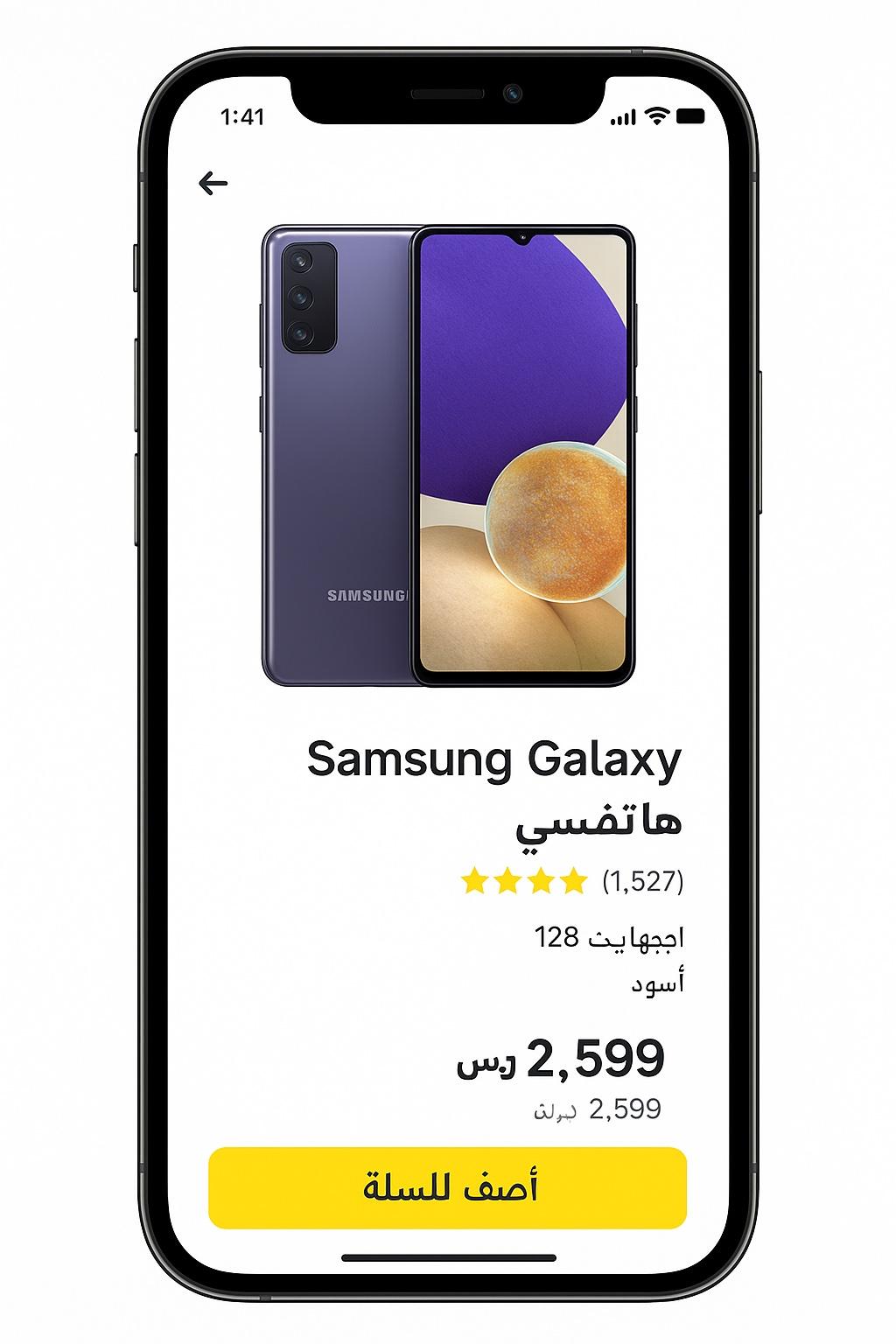
Noon (E-commerce)

Language approach: Fully bilingual with smart language mixing

Code-switching examples:

  • "أضف للسلة" with English product names
  • "Brand: Nike" in Arabic interface
  • Price: "99.99 ريال" (number + currency)
  • Specs mix: "اللون: Blue"

What they do well:

  • Product names stay in original language (usually English)
  • Technical specifications often stay English
  • User reviews appear in the language they were written
  • Search works across both languages simultaneously
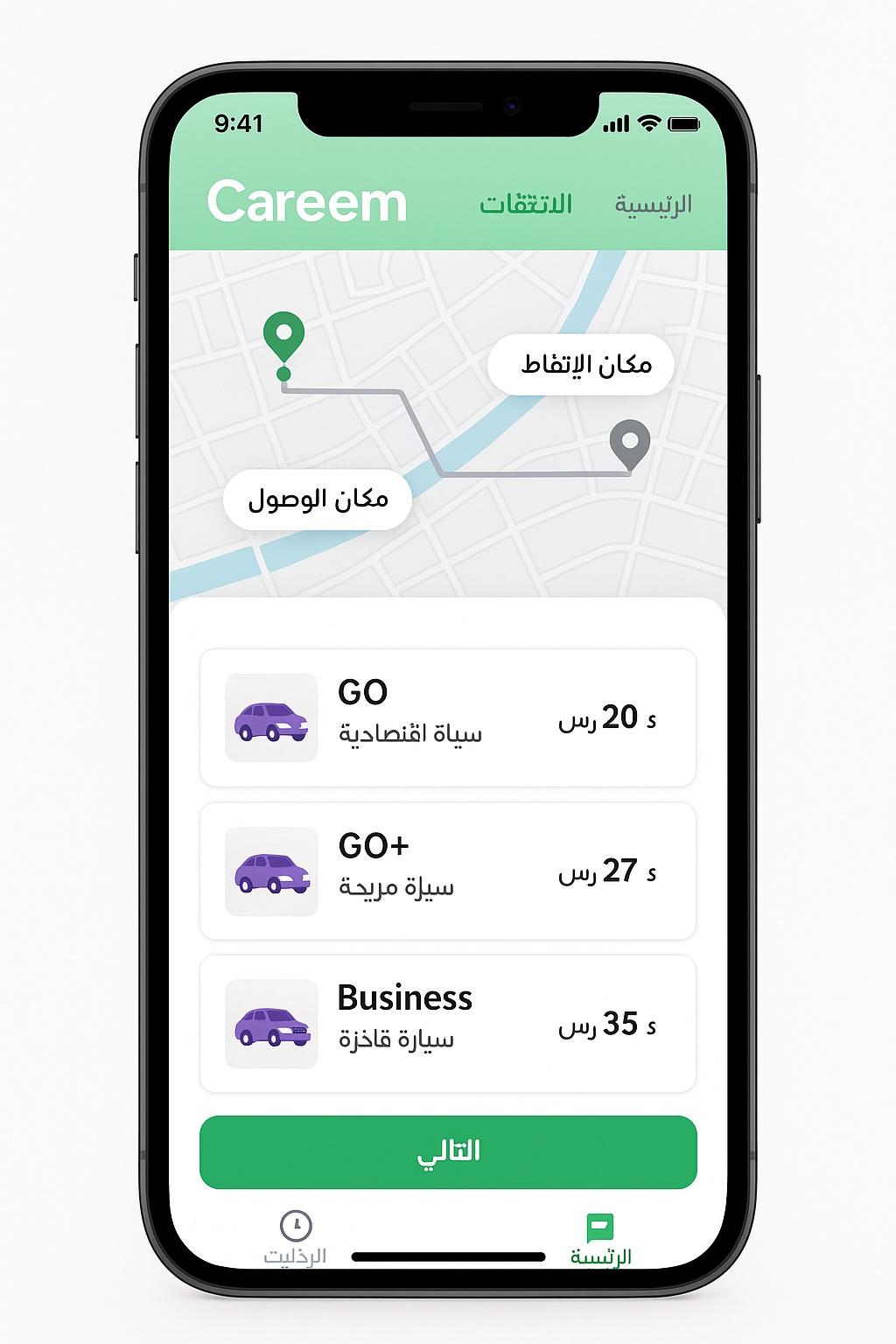
Careem app showing mixed Arabic-English content
Careem: Arabic UI with English brand elements
Noon product page with bilingual content
Noon: Product names in English, UI in Arabic

Design Principles for Bilingual UIs

1. Don't Force Language Purity

<!-- ❌ Forcing consistency creates awkwardness -->
<button>أضف إلى حقيبة التسوق</button>
<!-- "Shopping bag" translation feels unnatural -->
 
<!-- ✅ Let users speak naturally -->
<button>أضف للـ Cart</button>
<!-- Mixing feels natural to bilingual users -->

Principle: If your users naturally use English words in Arabic sentences, your UI can too—strategically.

2. Never Translate Proper Nouns

  • Brand names: Nike, Apple, Samsung stay as-is
  • Product names: iPhone, Galaxy, MacBook stay English
  • Person names: Keep original scripts and spelling
  • Place names: Use local conventions (New York, نيويورك, or both)
// Good: Brand names untranslated
<ProductCard
  brand="Nike"
  name="Air Max 270"
  description="حذاء رياضي مريح للاستخدام اليومي"
/>
 
// Bad: Transliterating brand names
<ProductCard
  brand="نايكي"  // Awkward and reduces recognition
  name="إير ماكس ٢٧٠"
  description="حذاء رياضي مريح للاستخدام اليومي"
/>

3. Let Technical Terms Stay English

Many technical terms are more recognizable in English:

Commonly kept English:

  • Email (not بريد إلكتروني)
  • Download (not تنزيل)
  • Upload (not رفع)
  • Login (not تسجيل الدخول) - though this one varies
  • Notification (not إشعار) - varies by app
  • Settings (sometimes stays English)

Test with real users. Some technical terms should be translated, others feel more natural in English. There's no universal rule—it depends on your audience and context.

4. Support Mixed-Language Input

<!-- Search that works with mixed input -->
<input
  type="search"
  placeholder="ابحث عن منتجات، brands، أو categories"
  lang="ar"
/>

Your search should handle:

  • Pure Arabic: "حذاء رياضي"
  • Pure English: "running shoes"
  • Mixed: "حذاء Nike"
  • Arabizi: "7e2a2 rya'6y"

5. Respect User-Generated Content

Don't force translation of user reviews, comments, or messages. Users will naturally code-switch:

<!-- User review as written -->
<div class="review">
  <p lang="ar">
    المنتج حلو بس the delivery كان متأخر شوي
  </p>
  <span class="author">@user123</span>
</div>

Apply the lang attribute to the container, but let the mixed content exist naturally.

Code-Switching Decision Framework

UI ElementRecommendationExample
Brand namesAlways keep original"Careem", "Noon", "Apple"
Product namesKeep original"iPhone 15 Pro", "Galaxy S24"
Interface actionsLocalize fully"أضف إلى السلة" not "Add to cart"
Technical specsContext-dependent"RAM", "Storage" often stay English
CategoriesLocalize"إلكترونيات" not "Electronics"
User contentNever modifyShow as user wrote it
Numbers & unitsMixed is OK"99 ريال", "5 km"
Error messagesLocalize fullyUsers need to understand problems

Designing for Language Choice

Don't Auto-Detect Based on Location

// ❌ Bad: Forcing Arabic based on location
if (userCountry === 'SA' || userCountry === 'AE') {
  setLanguage('ar');
}
 
// ✅ Better: Ask or remember preference
const userLanguage = localStorage.getItem('preferred-language')
  || navigator.language
  || 'en'; // Sensible default

Why this matters:

  • Expatriates living in Arabic countries may prefer English
  • Arabic speakers traveling may want to keep Arabic
  • Business users may need English for work, Arabic for personal

Make Language Switching Easy

// Language switcher always accessible
<LanguageSwitcher>
  <option value="ar">العربية</option>
  <option value="en">English</option>
  <option value="fr">Français</option>
</LanguageSwitcher>

Best practices:

  • Show switcher in header/footer
  • Display language names in their own script
  • Remember choice across sessions
  • Don't require sign-in to change language

Place the language switcher where users expect it: top-right corner in LTR layouts, top-left in RTL layouts. Use a globe icon 🌐 for universal recognition.

Per-Content Language

Some platforms let users set language preferences per content type:

const userPreferences = {
  interfaceLanguage: 'ar',      // UI in Arabic
  contentLanguage: 'en',        // Articles in English
  notificationLanguage: 'ar',   // Notifications in Arabic
  supportLanguage: 'en'         // Customer support in English
};

This recognizes that users may want Arabic UI but English content (common for tech news, for example).

Handling Mixed-Direction Content

When you have Arabic and English in the same line:

<!-- Wrapper has base direction -->
<p dir="rtl">
  اشترِ
  <span lang="en">iPhone 15 Pro</span>
  الآن بسعر
  <span dir="ltr">$999</span>
</p>

Renders as:

الآن بسعر $999 iPhone 15 Pro اشترِ

The Unicode Bidirectional Algorithm handles this automatically, but you can help it:

/* Isolate embedded content */
[lang="en"] {
  unicode-bidi: isolate;
}
 
/* Keep numbers LTR */
.price {
  direction: ltr;
  unicode-bidi: embed;
}

Be careful with punctuation in mixed-direction text. Periods, commas, and question marks can appear in unexpected places. Test thoroughly with real content.

Chat and Messaging Interfaces

Chat is where code-switching happens most naturally.

Support Both Scripts

<ChatMessage dir="auto" lang="ar">
  <Avatar user={user} />
  <MessageBubble>
    السلام عليكم! I sent you the document
  </MessageBubble>
  <Timestamp>2:34 PM</Timestamp>
</ChatMessage>

Use dir="auto" for chat messages. The browser will detect the first strong directional character and set direction accordingly.

Arabizi Detection

For extra polish, detect and render Arabizi:

function isArabizi(text) {
  // Contains Latin letters AND Arabic-indicating numbers
  const hasLatinLetters = /[a-zA-Z]/.test(text);
  const hasArabiziNumbers = /[0-9]/.test(text);
  const hasArabicKeywords = /\b(inshallah|wallah|yalla|habibi)\b/i.test(text);
 
  return hasLatinLetters && (hasArabiziNumbers || hasArabicKeywords);
}
 
// Style Arabizi messages differently (optional)
if (isArabizi(messageText)) {
  messageClass += ' arabizi';
}

You probably don't want to convert Arabizi to Arabic script (users chose Arabizi intentionally), but you might want to:

  • Tag it for analytics
  • Adjust text styling
  • Improve search to match Arabizi queries with Arabic content

Form Inputs and Mixed Content

Smart Input Handling

<FormField>
  <label htmlFor="fullName">
    {lang === 'ar' ? 'الاسم الكامل' : 'Full Name'}
  </label>
  <input
    id="fullName"
    type="text"
    dir="auto" // Adapts to input content
    placeholder={
      lang === 'ar'
        ? 'مثال: أحمد محمد'
        : 'e.g., Ahmed Mohamed'
    }
  />
</FormField>

Mixed Form Example

// E-commerce checkout - naturally bilingual
<form>
  <input
    name="fullName"
    placeholder="الاسم الكامل"
    dir="auto"
  />
  <input
    name="email"
    type="email"
    placeholder="Email"
    dir="ltr" // Email is always LTR
  />
  <input
    name="phone"
    type="tel"
    placeholder="رقم الجوال"
    dir="ltr" // Phone numbers are LTR
  />
  <input
    name="address"
    placeholder="العنوان"
    dir="auto" // Address might mix scripts
  />
</form>

Key Takeaways

  1. Code-switching is natural: Bilingual users mix languages in speech and expect to do so in interfaces

  2. Don't force purity: Letting technical terms or brand names stay English in Arabic interfaces is often more natural

  3. Arabizi is real: Millions use it daily. Your search and chat should handle it

  4. Never translate proper nouns: Brand names, product names, and people's names stay in original form

  5. Respect user-generated content: Don't force-translate reviews, comments, or messages

  6. Make switching easy: Language switcher should be accessible and remember preferences

  7. Use dir="auto": For user-generated content, let the browser detect direction

  8. Test with real users: What "feels natural" varies by region and demographic

  9. Think per-context: Users may want different languages for UI, content, and notifications

  10. Study successful local apps: Careem, Noon, and Talabat have refined bilingual UX through real usage

Further Reading

  • Building Accessible Forms for Arabic Users
  • Choosing Arabic Fonts for the Web
  • Understanding RTL Text Direction
  • The Shared Roots of Arabic and Urdu Script
bilingual
code-switching
ux
cultural-context
arabic
localization
Back to Blog

Related Articles

Reading Patterns: How Layout Should Follow the Eye

8 min read

Building Accessible Forms for Arabic Users

12 min read

Icon Direction: What Flips and What Doesn't

8 min read

  1. Home
  2. Blog
  3. Designing for Bilingual Users: Code-Switching in UI
Cultural Context

Designing for Bilingual Users: Code-Switching in UI

Explore how bilingual users naturally mix languages—and why your UI should embrace code-switching rather than fight it.

10 min read26
Designing for Bilingual Users: Code-Switching in UI
AM

Amira Hassan

Linguist and typographer specializing in Arabic script history and evolution.

The Reality of Bilingual Communication

Walk into any café in Dubai, Beirut, or Casablanca, and you'll hear something like this:

"أنا going to the mall بعدين، you coming معي؟"

This seamless mixing of Arabic and English—known as code-switching—is how millions of people actually communicate. It's not confusion or poor language skills; it's a sophisticated linguistic practice that reflects the reality of multilingual life.

Yet most applications force users to pick a single language and stick with it. This creates friction between how people actually think and communicate and how we ask them to interact with our interfaces.

"

"Code-switching isn't a bug in human communication—it's a feature. Your UI should reflect that."

"

What is Code-Switching?

Code-switching is the practice of alternating between two or more languages within a single conversation or even a single sentence. It happens naturally among bilingual speakers and serves important social and cognitive functions.

Why People Code-Switch

  1. Efficiency: Some concepts are easier to express in one language
  2. Identity: Switching languages signals group membership
  3. Emphasis: Changing languages adds emotional weight
  4. Filling gaps: Using a word from another language when the first doesn't have an equivalent
  5. Social context: Adapting to the language comfort of others

In the Gulf states, it's incredibly common to mix Arabic and English:

  • Brand names: Always in English, even in Arabic sentences
  • Tech terms: "download", "app", "screenshot" often stay English
  • Work vocabulary: Many professional terms are English
  • Numbers: Sometimes spoken in English, even in Arabic conversations

Studies show that code-switching is more cognitively complex than speaking a single language. Bilingual users who code-switch are expert language managers, not confused speakers.

The Arabizi Phenomenon

Arabizi (also called "Franco-Arab" or "3arabeezy") is Arabic written using Latin letters and numbers to represent sounds that don't exist in the Latin alphabet.

How Arabizi Works

Numbers represent Arabic sounds:

  • 2 = ء (hamza/glottal stop)
  • 3 = ع (ayn)
  • 5 = خ (kha)
  • 6 = ط (ta)
  • 7 = ح (ha)
  • 8 = ق (qaf) - sometimes
  • 9 = ص (sad)

Examples:

  • مرحبا (marhaba) → mar7aba
  • صباح الخير (sabah al-khair) → 9aba7 el5eir
  • معلش (ma3lish) → ma3lesh
  • إن شاء الله (inshallah) → inshallah or inshaa2allah

Why Arabizi Exists

  1. Early internet constraints: Before good Arabic keyboard support, Arabizi was necessary
  2. Speed: Typing Arabizi on QWERTY keyboards is faster for some users
  3. Platform limitations: Some systems still handle Arabic poorly
  4. Casualness: Arabizi signals informal, friendly communication
  5. Habit: A generation grew up using it and continues by choice

"When I chat with friends, I use Arabizi. It feels more casual than formal Arabic script, and faster than switching keyboards. But for work documents, I switch to proper Arabic."

— Sara, 28, UX Designer in Cairo

While Arabizi was born from technical limitations, it's now a cultural choice. Many young Arabs prefer it for informal communication even when Arabic keyboards are easily available.

Don't assume Arabizi is disappearing. For many users, especially in informal contexts like chat and social media, it remains the preferred way to write Arabic casually.

Real-World Code-Switching in Apps

Let's look at how successful regional apps handle bilingual users.

Careem (Ride-hailing)

Language approach: Primarily Arabic interface with English brand names

Code-switching examples:

  • Button text: "احجز Careem الآن" (Book Careem now)
  • Car types: "Careem GO", "Careem Business" (English names in Arabic interface)
  • Payment: "ادفع بواسطة Credit Card"

What they do well:

  • Don't translate the brand name
  • Keep product tier names in English (recognizable globally)
  • Use Arabic for actions and instructions
  • Allow mixed content in support chat

Talabat (Food delivery)

Language approach: Fully localized interfaces but embraces English restaurant names

Code-switching examples:

  • "اطلب من McDonald's"
  • "Pizza Hut - توصيل مجاني"
  • Restaurant names stay in original language
  • Cuisine categories: "Italian", "Asian", "مأكولات عربية"

What they do well:

  • Never translate restaurant names
  • Show cuisine types in the language users search for
  • Arabic descriptions even for foreign restaurants
  • Mixed language in reviews (users write naturally)

Noon (E-commerce)

Language approach: Fully bilingual with smart language mixing

Code-switching examples:

  • "أضف للسلة" with English product names
  • "Brand: Nike" in Arabic interface
  • Price: "99.99 ريال" (number + currency)
  • Specs mix: "اللون: Blue"

What they do well:

  • Product names stay in original language (usually English)
  • Technical specifications often stay English
  • User reviews appear in the language they were written
  • Search works across both languages simultaneously
Careem app showing mixed Arabic-English content
Careem: Arabic UI with English brand elements
Noon product page with bilingual content
Noon: Product names in English, UI in Arabic

Design Principles for Bilingual UIs

1. Don't Force Language Purity

<!-- ❌ Forcing consistency creates awkwardness -->
<button>أضف إلى حقيبة التسوق</button>
<!-- "Shopping bag" translation feels unnatural -->
 
<!-- ✅ Let users speak naturally -->
<button>أضف للـ Cart</button>
<!-- Mixing feels natural to bilingual users -->

Principle: If your users naturally use English words in Arabic sentences, your UI can too—strategically.

2. Never Translate Proper Nouns

  • Brand names: Nike, Apple, Samsung stay as-is
  • Product names: iPhone, Galaxy, MacBook stay English
  • Person names: Keep original scripts and spelling
  • Place names: Use local conventions (New York, نيويورك, or both)
// Good: Brand names untranslated
<ProductCard
  brand="Nike"
  name="Air Max 270"
  description="حذاء رياضي مريح للاستخدام اليومي"
/>
 
// Bad: Transliterating brand names
<ProductCard
  brand="نايكي"  // Awkward and reduces recognition
  name="إير ماكس ٢٧٠"
  description="حذاء رياضي مريح للاستخدام اليومي"
/>

3. Let Technical Terms Stay English

Many technical terms are more recognizable in English:

Commonly kept English:

  • Email (not بريد إلكتروني)
  • Download (not تنزيل)
  • Upload (not رفع)
  • Login (not تسجيل الدخول) - though this one varies
  • Notification (not إشعار) - varies by app
  • Settings (sometimes stays English)

Test with real users. Some technical terms should be translated, others feel more natural in English. There's no universal rule—it depends on your audience and context.

4. Support Mixed-Language Input

<!-- Search that works with mixed input -->
<input
  type="search"
  placeholder="ابحث عن منتجات، brands، أو categories"
  lang="ar"
/>

Your search should handle:

  • Pure Arabic: "حذاء رياضي"
  • Pure English: "running shoes"
  • Mixed: "حذاء Nike"
  • Arabizi: "7e2a2 rya'6y"

5. Respect User-Generated Content

Don't force translation of user reviews, comments, or messages. Users will naturally code-switch:

<!-- User review as written -->
<div class="review">
  <p lang="ar">
    المنتج حلو بس the delivery كان متأخر شوي
  </p>
  <span class="author">@user123</span>
</div>

Apply the lang attribute to the container, but let the mixed content exist naturally.

Code-Switching Decision Framework

UI ElementRecommendationExample
Brand namesAlways keep original"Careem", "Noon", "Apple"
Product namesKeep original"iPhone 15 Pro", "Galaxy S24"
Interface actionsLocalize fully"أضف إلى السلة" not "Add to cart"
Technical specsContext-dependent"RAM", "Storage" often stay English
CategoriesLocalize"إلكترونيات" not "Electronics"
User contentNever modifyShow as user wrote it
Numbers & unitsMixed is OK"99 ريال", "5 km"
Error messagesLocalize fullyUsers need to understand problems

Designing for Language Choice

Don't Auto-Detect Based on Location

// ❌ Bad: Forcing Arabic based on location
if (userCountry === 'SA' || userCountry === 'AE') {
  setLanguage('ar');
}
 
// ✅ Better: Ask or remember preference
const userLanguage = localStorage.getItem('preferred-language')
  || navigator.language
  || 'en'; // Sensible default

Why this matters:

  • Expatriates living in Arabic countries may prefer English
  • Arabic speakers traveling may want to keep Arabic
  • Business users may need English for work, Arabic for personal

Make Language Switching Easy

// Language switcher always accessible
<LanguageSwitcher>
  <option value="ar">العربية</option>
  <option value="en">English</option>
  <option value="fr">Français</option>
</LanguageSwitcher>

Best practices:

  • Show switcher in header/footer
  • Display language names in their own script
  • Remember choice across sessions
  • Don't require sign-in to change language

Place the language switcher where users expect it: top-right corner in LTR layouts, top-left in RTL layouts. Use a globe icon 🌐 for universal recognition.

Per-Content Language

Some platforms let users set language preferences per content type:

const userPreferences = {
  interfaceLanguage: 'ar',      // UI in Arabic
  contentLanguage: 'en',        // Articles in English
  notificationLanguage: 'ar',   // Notifications in Arabic
  supportLanguage: 'en'         // Customer support in English
};

This recognizes that users may want Arabic UI but English content (common for tech news, for example).

Handling Mixed-Direction Content

When you have Arabic and English in the same line:

<!-- Wrapper has base direction -->
<p dir="rtl">
  اشترِ
  <span lang="en">iPhone 15 Pro</span>
  الآن بسعر
  <span dir="ltr">$999</span>
</p>

Renders as:

الآن بسعر $999 iPhone 15 Pro اشترِ

The Unicode Bidirectional Algorithm handles this automatically, but you can help it:

/* Isolate embedded content */
[lang="en"] {
  unicode-bidi: isolate;
}
 
/* Keep numbers LTR */
.price {
  direction: ltr;
  unicode-bidi: embed;
}

Be careful with punctuation in mixed-direction text. Periods, commas, and question marks can appear in unexpected places. Test thoroughly with real content.

Chat and Messaging Interfaces

Chat is where code-switching happens most naturally.

Support Both Scripts

<ChatMessage dir="auto" lang="ar">
  <Avatar user={user} />
  <MessageBubble>
    السلام عليكم! I sent you the document
  </MessageBubble>
  <Timestamp>2:34 PM</Timestamp>
</ChatMessage>

Use dir="auto" for chat messages. The browser will detect the first strong directional character and set direction accordingly.

Arabizi Detection

For extra polish, detect and render Arabizi:

function isArabizi(text) {
  // Contains Latin letters AND Arabic-indicating numbers
  const hasLatinLetters = /[a-zA-Z]/.test(text);
  const hasArabiziNumbers = /[0-9]/.test(text);
  const hasArabicKeywords = /\b(inshallah|wallah|yalla|habibi)\b/i.test(text);
 
  return hasLatinLetters && (hasArabiziNumbers || hasArabicKeywords);
}
 
// Style Arabizi messages differently (optional)
if (isArabizi(messageText)) {
  messageClass += ' arabizi';
}

You probably don't want to convert Arabizi to Arabic script (users chose Arabizi intentionally), but you might want to:

  • Tag it for analytics
  • Adjust text styling
  • Improve search to match Arabizi queries with Arabic content

Form Inputs and Mixed Content

Smart Input Handling

<FormField>
  <label htmlFor="fullName">
    {lang === 'ar' ? 'الاسم الكامل' : 'Full Name'}
  </label>
  <input
    id="fullName"
    type="text"
    dir="auto" // Adapts to input content
    placeholder={
      lang === 'ar'
        ? 'مثال: أحمد محمد'
        : 'e.g., Ahmed Mohamed'
    }
  />
</FormField>

Mixed Form Example

// E-commerce checkout - naturally bilingual
<form>
  <input
    name="fullName"
    placeholder="الاسم الكامل"
    dir="auto"
  />
  <input
    name="email"
    type="email"
    placeholder="Email"
    dir="ltr" // Email is always LTR
  />
  <input
    name="phone"
    type="tel"
    placeholder="رقم الجوال"
    dir="ltr" // Phone numbers are LTR
  />
  <input
    name="address"
    placeholder="العنوان"
    dir="auto" // Address might mix scripts
  />
</form>

Key Takeaways

  1. Code-switching is natural: Bilingual users mix languages in speech and expect to do so in interfaces

  2. Don't force purity: Letting technical terms or brand names stay English in Arabic interfaces is often more natural

  3. Arabizi is real: Millions use it daily. Your search and chat should handle it

  4. Never translate proper nouns: Brand names, product names, and people's names stay in original form

  5. Respect user-generated content: Don't force-translate reviews, comments, or messages

  6. Make switching easy: Language switcher should be accessible and remember preferences

  7. Use dir="auto": For user-generated content, let the browser detect direction

  8. Test with real users: What "feels natural" varies by region and demographic

  9. Think per-context: Users may want different languages for UI, content, and notifications

  10. Study successful local apps: Careem, Noon, and Talabat have refined bilingual UX through real usage

Further Reading

  • Building Accessible Forms for Arabic Users
  • Choosing Arabic Fonts for the Web
  • Understanding RTL Text Direction
  • The Shared Roots of Arabic and Urdu Script
bilingual
code-switching
ux
cultural-context
arabic
localization
Back to Blog

Related Articles

Reading Patterns: How Layout Should Follow the Eye

8 min read

Building Accessible Forms for Arabic Users

12 min read

Icon Direction: What Flips and What Doesn't

8 min read

Comments (0)

Sign in to join the conversation

Comments (0)

Sign in to join the conversation